
1.3 Configure models and credentials
Before you begin, have a model API key you are authorized to use and start Teloa locally. In every edition and deployment option, you pay for your own model calls.
Open model settings
Open Settings → Models and find your model provider. Teloa manages business areas and colleagues; the underlying DSH settings manage models, credentials, and the runtime environment.
Save the key in the credentials section for the corresponding model provider. Then check that the provider, model name, and runtime profile match. Do not put keys in a colleague's responsibilities, group messages, skill content, or ordinary reference material.
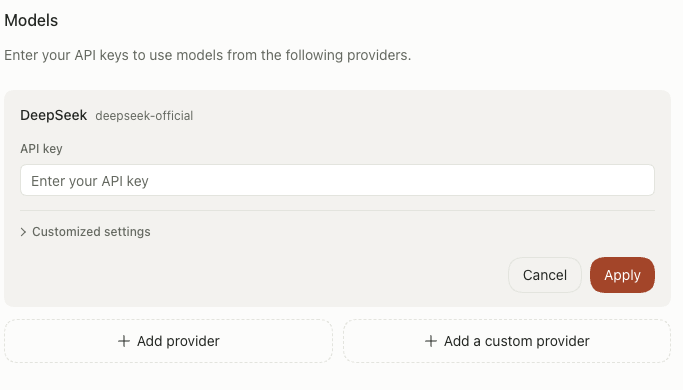
English interface before credential setup. Enter your own key and save it. The empty field shown here does not indicate a working model connection.
Verify a response
Start a general conversation and enter:
Reply only with “Model connection is working.” Do not use tools or access reference material.Once you receive a response, test a colleague task. Opening the page, saving credentials, and successfully running a model task are three separate checks.
Check the colleague's configuration
If a regular conversation works but a colleague task fails, check that colleague's runtime profile and the error message. Pause the colleague before changing its role definition or tool permissions. After saving, return the colleague to active status and verify with a small task.
Common problems
| Symptom | What to do |
|---|---|
| Authentication fails | Check the credentials source to confirm that the key is valid and belongs to the selected provider. Save it again and retry. |
| The model does not exist or is unsupported | Use a model identifier actually available from that provider. Check whether the runtime profile still references an old model. |
| Insufficient quota or rate limiting | Check your quota and request limits with the model provider. A Teloa license does not automatically add tokens. |
| Network failure | Check access to the model service from the device running Teloa. A browser connection does not prove that the host can connect. |
| Conversation works, but a task using tools fails | Check the model's tool-calling support, the colleague's permissions, and the execution record. |
The default setup targets DeepSeek. Configure other models, including models on a private network, according to what the current Harness actually supports, and verify them separately. This guide does not promise that every compatible endpoint will work without changes.
External models receive the authorized context needed for the task. See Privacy and permissions for where data goes.