
6.3 Develop an AI team template
A team template combines employees and shared methods. Receiving it does not configure accounts or grant permissions. A collaboration group, a template and a temporary execution team for one task are distinct objects.
Create it in Teloa with natural language
These examples were verified with real MiniMax; the fixes are included in 0.2.10. Screenshots use fictional feedback, and generated content varies by model.
Open Marketplace > Create > Create AI team. Enter this request, select Continue, review it in the conversation and send:
Prepare a “Feedback improvement team” template with two employees:
1. Feedback analyst: group my numbered feedback, count issues and draft
   a brief with source IDs.
2. Feedback reviewer: check groups, counts and citations; return errors
   and omissions to the analyst.
The analyst coordinates, revises failed work and delivers after review.
Both share a “Feedback brief method”, skill ID feedback-brief-method,
and use supplied text only. Include no accounts, secrets, automations
or external-tool grants. This original example uses MIT.
Preview the complete team template first.
Inspect both roles, coordinator, shared method and relationships, then Preview and share. Export a file or publish a link and receive it through Employees > Import template. Add members and install the bundled method, then Create AI team. Check actual group membership, default models and skill bindings before resuming the employees that will work.
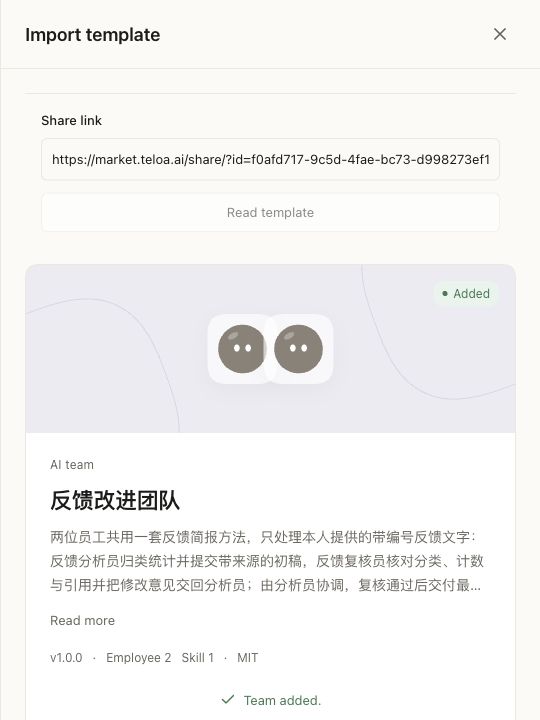
Local MiniMax test with the Chinese team content: two employees and one shared method received. Create the group, configure and enable employees before assigning work. Select the image to open it full-size.
Test in three steps. Use the input's @ picker to select the actual employee; typing a name alone is not a mention.
@Feedback analyst and ask for a draft using the shared method:
textCount original IDs; do not deduplicate. Group issues, count them and preserve source IDs. [F1] CSV import reports an encoding error. [F2] Please support dark mode. [F3] CSV import reports an encoding error. Submit a draft first; finalize after review. Process text in this group only.After the draft returns, reply to it in the same topic and @Feedback reviewer: “Check groups, counts and citations. Expect two CSV reports (F1, F3) and one dark-mode request (F2). Report a pass or specific errors; do not infer customer identities.”
After the actual review, @Feedback analyst: “Apply this topic's review comments and deliver the final brief, retaining unresolved questions.”
Inspect both employees' actual replies and the final brief. Template handoff instructions do not create sequential task dependencies automatically. One employee replying does not complete the review.
If both employees already exist, ask in a regular conversation to check the directory and create a Feedback improvement group using the existing analyst and reviewer, without duplicates. Check the proposed members and confirm. See leading employees in a group.
Complete example
Download the team example. Extract team.json and preview it through Employees > Import template. It contains a writer and a reviewer sharing the evidence-brief skill, with no account connection or scheduled execution.
Members and coordinator
Use teloa.template-share/v2 with subject: "team" and at least two inner resources of kind: "role". Each is a complete teloa.role/v1 with five structured responsibility arrays. Define each member's inputs, outputs and handoff conditions. The example declares its coordinator as:
{"team":{"coordinatorResourceId":"employee-0"}}This must name an employee resource in the package, not a human account or installed employee ID. Coordination metadata grants no additional authority.
List fixed versions and local paths for every employee and skill in teloa.json.resources. Two role-skill relationships in the example bind both employees to the same method. A resource path belongs to one resource; names and file order do not infer relationships. Entrypoints can name skills or work templates, not employees.
Dependencies and preparation
Design handoffs before writing member JSON
For an evidence brief team, agree on the following work design. This table does not introduce new protocol fields.
| Member | Input | Output | Boundary |
|---|---|---|---|
| Evidence writer | Numbered notes and acceptance criteria | Sourced draft and unknowns | Does not declare its own draft reviewed |
| Evidence reviewer | Same notes and the draft | Specific passes, corrections and unverifiable claims | Adds no unsupported facts |
| Coordinator, handled by the writer | Goal and both members' outputs | Final candidate with review comments | A member response is not owner acceptance |
The example already has separate writer and reviewer definitions. Adapt each member's duty, triggers and delivery checks for your team. These are the reviewer fields to merge into the complete employee definition:
{
  "duty": "Review a draft against the supplied source notes. Return specific corrections and unresolved issues.",
  "responsibility": {
    "triggers": ["When assigned source notes and a draft to review."],
    "autonomousActions": ["Check each claim, number and citation against the supplied notes."],
    "confirmationPoints": ["Ask before accessing additional material or distributing the draft."],
    "escalationRules": ["Identify unsupported claims and conflicting evidence without inventing a resolution."],
    "deliveryChecks": ["For each issue, identify the claim, source, correction and any remaining uncertainty."]
  }
}
This is a replacement fragment, not an importable role file. Retain the complete format, name, kind, data scope and execution scope. Share a method when useful, while keeping each role's goal and handoff criteria distinct.
Encode the references
sources/
  teloa.json
  roles/employee-0.json               # Writing and coordination
  roles/employee-1.json               # Independent review
  skills/evidence-brief/SKILL.md       # Shared method
The relevant portion of the internal manifest is:
{
  "relations": [
    {"kind":"role-skill","from":"employee-0","to":"evidence-brief"},
    {"kind":"role-skill","from":"employee-1","to":"evidence-brief"}
  ],
  "entrypoints": ["evidence-brief"]
}
Use the downloaded complete manifest for import. The outer team.coordinatorResourceId is employee-0; relations belongs in the inner manifest. Declare a shared skill once and connect each member explicitly. Never substitute installed account or employee IDs.
Assign writing first, then pass the draft to the reviewer. Explicitly mention the intended employee in a group and inspect who took the work. File order does not schedule execution.
Begin with a team that needs no external system. For connections, declare the connections capability and include credential-free connection declarations; receivers configure accounts and grants. Plans need automation, clear triggers and usage expectations, and explicit enablement through the receiving UI. Complete business configuration requires an inner v4 manifest; see packages.
After editing, run node pack.mjs team.json and preview the updated team.
Verify the full path
Use the fictional N1–N3 notes in the employee tutorial:
After adding the members, choose Form AI team, review the group name, choose Next, review both employees and the coordinator, then choose Create group. The example group has three members including you. Employees stay paused until configured and enabled.
- Obtain the writer's draft and inspect its actual source and employee identity.
- Deliberately change its feedback total to 21 before asking the reviewer to check it. The reviewer should identify 20 from N1 and N2, rather than copy the error.
- Return the corrections to the writer and request a final candidate retaining the unknown user split.
- Stop or pause a test work item. Another member's response must not mark it complete. Refresh and inspect results and task provenance.
- Preview from a receiving environment without external connections. Requirements remain visible; author accounts, keys, group history and approvals are not inherited.
Retain input, both members' work and results, corrections, stop outcome and installed versions. Two members appearing in a group does not establish successful collaboration.
| Problem | Check |
|---|---|
| Classified as one employee | subject: team, at least two role resources |
| Missing coordinator | Reference an existing role resource ID |
| One member lacks the method | A role-skill relation for each intended member |
| Duplicate or misassigned answers | Narrow duties and triggers; specify handoff inputs and outputs |
| No automatic work after adding | Definition, setup, activation, group creation and assignment are separate |
| Existing group does not change after an update | Fixed copies do not auto-update; preview differences and adopt through the product |
External integrations currently grant a single employee. If a coordinator fronts a business integration, verify its actual collaboration permissions separately; a team package does not imply a supported team API.
Run the format checks, then inspect both employees, the coordinator and the method in the preview. Review the destination business and resource choices before adding. Follow the resulting UI to form a collaboration group, check members and paused state, and enable only the intended employees. Test writing, review and sourced delivery with fictional material. Adding a template does not mean collaboration has executed.
Publish a new fixed version when member definitions or methods change, checking all references. Use offline or online sharing to distribute a fixed copy; official catalog publication has a separate review process.