
6.6 Call employees from business systems
Business systems can delegate order checks, research summaries or ticket analysis to existing AI employees and track results by work ID. HTTP, the SDK and MCP share employee identity, business scope, BYOK and the workbench Task/Run execution pipeline.
This interface calls Teloa employees. To let employees read an external service, see MCP used by employees.
Create an integration key
Open Settings > Employee integrations, select an active employee with complete responsibilities, and choose its business scope and key lifetime. Access defaults to read-only. Starting, continuing or requesting cancellation of work requires the owner to select those permissions. Creating a key does not execute work or grant additional employee tools.
The API key is shown once. Save it in your business server’s secret manager, never in chat, browser frontend code or a repository. A configured callback also receives a separate signing secret, shown once. Save it together with the API key. If the signing secret is lost, revoke and recreate the integration.
- Keys bind a fixed employee configuration version and one business scope. Changes to responsibilities, tool grants or employee activation can require a new owner grant.
- Each integration permits 1–4 unfinished work items, selected by the owner. Existing platform admission and work budgets still apply.
- Rotating a key immediately invalidates the old API key while preserving work and results. It does not rotate the callback signing secret.
- Expiration or revocation rejects new requests, prevents queued dispatch and cancels future callbacks. Stop already accepted execution separately in the workbench. An external request already in flight may complete.
- Browser startup tokens and cookies cannot replace an integration key. Callers cannot approve tools or modify employees through this API. Callers may choose the round's
permissionModeand model, but those only set execution boundaries; they cannot expand employee tool grants or bypass workbench approval.
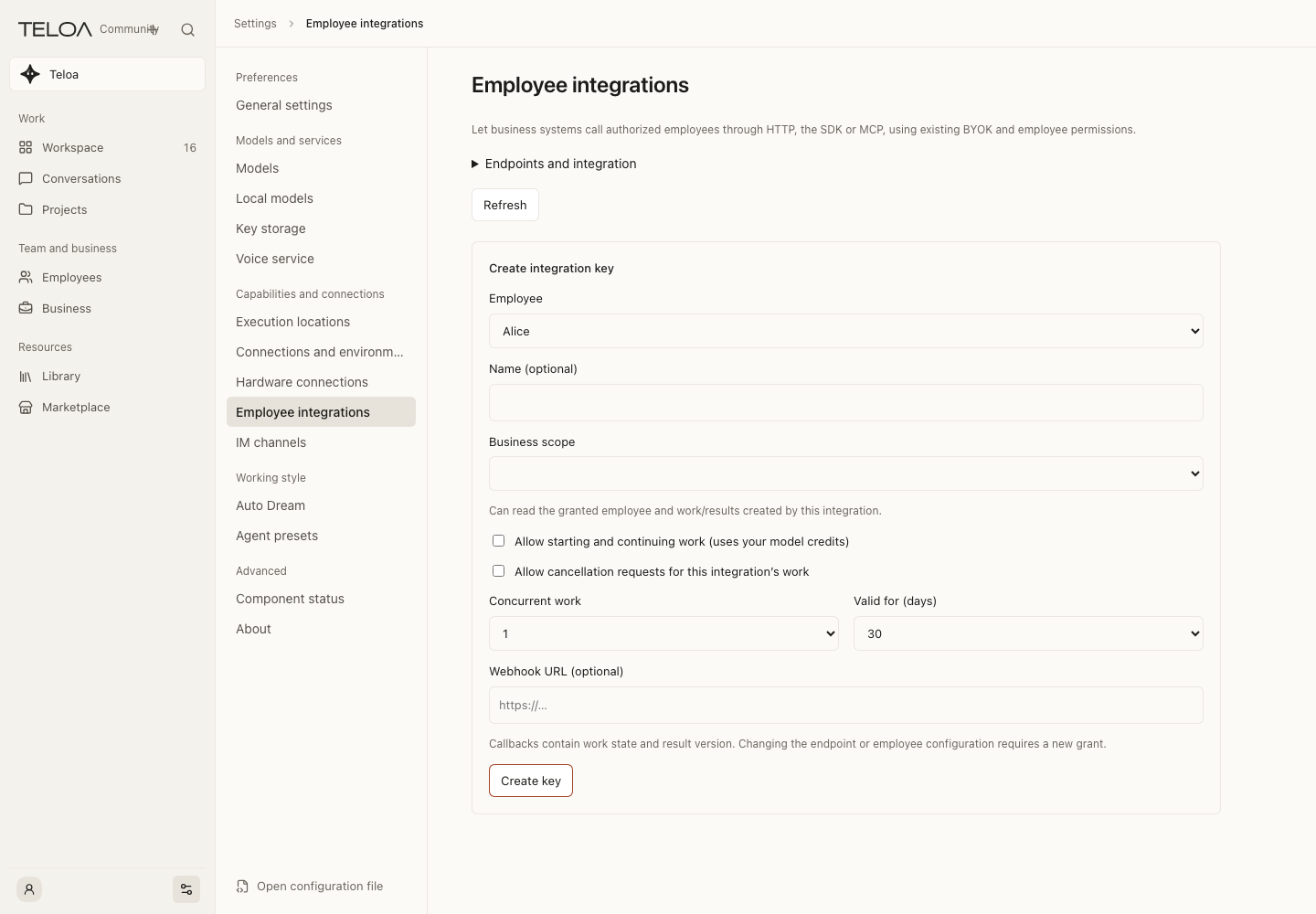
0.2.4 actual interface with example data.
HTTP and OpenAPI
The host serves /api/v1/openapi.json using OpenAPI 3.1 with request and response JSON Schemas. Business API requests use:
Authorization: Bearer <integration-key>
Content-Type: application/json
Idempotency-Key: <UUID persisted by the caller>
Persist a command’s idempotency key before sending it. After a disconnect or missing response, retry the same UUID and request body. Reusing a key for another body, action, work item, permissionMode or model returns 409. The SDK does not generate replacement identities or automatically retry mutations.
| Operation | HTTP path | Permission |
|---|---|---|
| Discover the granted employee | GET /api/v1/employees | read |
| Start work | POST /api/v1/works | execute |
| Read state and version | GET /api/v1/works/{workId} | read |
| Provide the next round’s instructions | POST /api/v1/works/{workId}/inputs | execute |
| Request cancellation | POST /api/v1/works/{workId}/cancel | cancel |
| Read a fixed result | GET /api/v1/works/{workId}/result?version=1 | read |
| Resume event reads | GET /api/v1/works/{workId}/events?after=0 | read |
Start bodies are {employeeId, input, title?, permissionMode?, model?}, with at most 6000 characters of input and 120 characters in a title. Continue bodies are {expectedVersion, input, permissionMode?, model?}; cancellation uses {expectedVersion}. Unknown fields are rejected. A 202 mutation response means accepted, not completed.
Execution mode and model
permissionMode: the execution boundary for this round:danger-full-access,workspace-writeorread-only. New work defaults todanger-full-accesswhen omitted; a continuation inherits the previous round when omitted. It cannot bypass the integration's execute permission, employee tool grants or workbench approval.model: the round's model selection,{provider, model, reasoningEffort?}. When omitted, the employee's configured default model is used. The provider/model must already be configured and available; otherwise the work fails withmodel_unavailableinstead of silently switching.- If the current preset cannot provide the mode, the work fails with
permission_mode_unavailable. Reusing an idempotency key requires the same body, permission mode and model as the first accepted request; otherwise the API returns 409.
A fixed successful result now creates a formal artifact, completes the linked task and updates work progress in one transaction. Read the fixed text through result; task and artifact versions settle together. A failed delivery leaves no partial artifact, and the caller can recover under the original idempotency key.
Continue only after the current round ends, using its latest expectedVersion. The work ID stays the same and a new Task/Run round is created. Provide complete instructions for that round; the host adds up to 1500 characters of the previous fixed result as context. Earlier results remain readable by version.
Run complete examples for all three entrypoints
Download the developer toolkit. Use Node.js 24 and install the pinned dependencies in the extracted directory:
npm installPrepare a dedicated test employee and configured model, then grant read, execute and cancel in its integration. Set TELOA_BASE_URL and TELOA_API_KEY in a trusted server environment. The URL is your Teloa origin, such as http://127.0.0.1:3100; the key is an integration key, not a model key. Keep it out of browsers, source files and shell history.
Choose the entrypoint to test. Each command uses your actual model and incurs usage:
node employee-api.mjs
node employee-sdk.mjs
node employee-mcp.mjs| File | Calls |
|---|---|
employee-api.mjs | Direct HTTP through Fetch |
employee-sdk.mjs | @teloa/sdk@0.2.4 |
employee-mcp.mjs | Official MCP client using Streamable HTTP and the seven employee tools |
employee-demo.mjs | Shared journal, polling, continuation, result verification and cancellation |
Each discovers the granted employee, submits a fictional order, waits for its result, continues under the same work ID, verifies the earlier result, then starts a bounded long-text task and requests cancellation.
Expect subtotal 115, discounted total 110, then 116 after adding 6. Output includes work IDs, both results and the actual cancellation state. Results and checksums are saved in demo-output/<entry>/results.json.
Before sending writes, commands.jsonl records requestId and body, then the receipt; it contains no key. An existing output directory stops the demo before sending requests. After network failure, inspect existing work and retry only the recorded ID/body. Do not delete receipts and submit a new work item. The demo does not implement a production recovery queue.
A polling timeout does not stop server work. waiting requires owner attention in the workbench. If the cancellation task already completed, the demo reports that actual terminal state rather than claiming cancellation succeeded.
Use the SDK in your own code
npm install --save-exact @teloa/sdk@0.2.4This complete read-only connection check can be saved as .mjs:
import {TeloaClient} from '@teloa/sdk'
const baseUrl = process.env.TELOA_BASE_URL
const apiKey = process.env.TELOA_API_KEY
if (!baseUrl || !apiKey) throw Error('Configure the integration URL and key first.')
const client = new TeloaClient({baseUrl, apiKey})
const {items} = await client.listEmployees()
console.log(items.map(employee => ({id: employee.id, name: employee.name})))
Use the complete download for writes and recovery behavior. The SDK uses Fetch, supports AbortSignal and timeouts, and never retries writes automatically. Other languages can implement the same OpenAPI requests.
States, results and errors
| State | Meaning |
|---|---|
| queued | Saved, awaiting dispatch |
| running | Accepted by the native runtime or executing |
| waiting | Awaiting approval, owner recovery or resolution of a blocker |
| succeeded | The round ended normally with a fixed nonempty result; its artifact was created and the linked task completed automatically |
| failed | No valid result was obtained, or configuration became invalid |
| cancel_requested | Cancellation requested, settlement not yet confirmed |
| cancelled | Cancellation confirmed, or withdrawn before dispatch |
Fixed results include work ID, round, version, text, SHA-256 and review: accepted|unreviewed. Successful execution does not imply a passed delivery review, and review does not replace final business or owner acceptance. The owner handles approvals in the workbench; the integration cannot approve tools for them.
result.text is generated text, not a guarantee of compliance with a JSON Schema requested in a prompt. A model may include Markdown fences. If your system needs structured data, independently parse and validate fields, values and business constraints. Preserve the original result on failure instead of treating generated text as a trusted business write.
Errors use {error:{code,message,requestId}}. HTTP 401 means an invalid, expired, rotated or revoked key; 403 means the operation was not granted; 404 means work is outside this integration or a result version is absent; 409 means a version, idempotency or work-state conflict; 413/415 indicate size or content-type errors; 429 means the granted concurrency limit was reached; 503 means the service is temporarily unavailable. Recover timeouts with the original idempotent identity rather than assuming a fresh execution is safe.
MCP Server for external agents
Use the host’s /mcp endpoint with Streamable HTTP and the same integration Bearer key. Tools are:
teloa_list_employees, teloa_start_work, teloa_get_work, teloa_continue_work, teloa_cancel_work, teloa_get_result, teloa_list_work_events.
Only granted operations are advertised. Guessing a hidden tool name does not increase permissions. Mutations carry a persistent requestId; continuation and cancellation also require the work version. Long work returns an ID promptly, then callers read state or results. It does not occupy a tool connection for the entire job. MCP Tasks extensions and A2A support are not advertised.
Signed CloudEvents callbacks
The owner fixes the callback URL when creating an integration; an external work request cannot substitute a destination. Changes send CloudEvents 1.0 with type ai.teloa.work.changed.v1 and content type application/cloudevents+json. Events contain work state and result version, without input text, credentials or result content.
Headers are teloa-webhook-id, teloa-webhook-timestamp and teloa-webhook-signature. The signature is:
v1=<hex HMAC-SHA256(signingSecret, timestamp + "." + rawBody)>Verify the raw body and timestamp before parsing JSON. The SDK’s verifyWebhook accepts a five-minute window by default. Receivers persist event IDs for deduplication and use work versions to handle potentially out-of-order notifications. Signature verification alone does not deduplicate events.
Each attempt has a 10-second timeout and does not follow redirects. Delivery automatically attempts up to five times, preserving the event ID; success requires 2xx. Inspect delivery records and manually retry failed events in Settings. Queues, cursors, fixed results and pending deliveries survive restarts. CloudEvents defines the envelope; Teloa’s persisted records, leases and retries implement delivery reliability.