
6.4 Develop an app
An app gives employees an addable capability: a reusable method or access to a business service. Start with a method app, then run a read-only MCP service.
Create it in Teloa with natural language
These examples were verified with real MiniMax; the fixes are included in 0.2.10. Screenshots use fictional feedback, and generated content varies by model.
Make a method app without an account
Open Marketplace > My apps and skills > Add app or skill (+) > Create app, then choose Create a shareable app template. Enter the request, select Continue, review it in the conversation and send:
Prepare a “Customer feedback desk” app template with one “Desk feedback
brief” skill. Use skill ID feedback-desk-brief to avoid a name collision.
Group supplied numbered feedback, count issues, cite evidence and list
open questions. Use supplied text only. Include no account connection,
external data source or employee. This is original work under MIT.
Use app ID feedback-desk-app and version 1.0.1. Preview the complete app
and skill content first; do not publish yet.
Check actual skill instructions, fixed version and license, with no credentials or invented connections. Select Preview and share, inspect the content, then export a file or publish a link. In Employees > Import template, read the file or link and confirm adding, including installation of the bundled skill.
Check that feedback-desk-brief is available in My apps and skills. Resolve any name collision first: an installation record alone does not prove that the method is callable. In a new conversation, ask to load the installed feedback-desk-brief and use the three feedback items and counting rules. Expect counts of two and one with source IDs. Bind the method before using it with an employee.
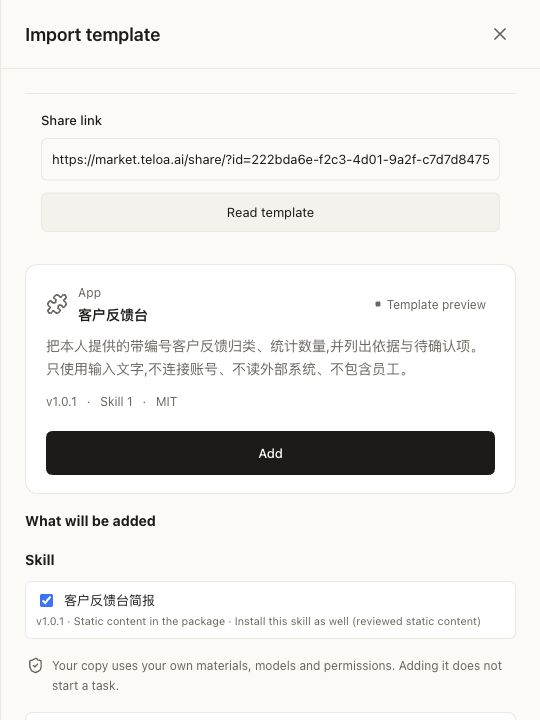
Local MiniMax test with the Chinese example content. The app contains its own skill; receive and install the method before testing it. Generating a template does not install an app. Select the image to open it full-size.
Connect your own MCP service
First run the read-only example service below, then enter this under Create app:
Add an MCP app named “Demo orders”.
Service URL: http://127.0.0.1:3277/mcp
Use Streamable HTTP. This local example requires no authentication.
Preview the connection definition first. Do not call tools or grant
employee access yet.
Check the URL and select Add and connect in the confirmation area. The example should discover get_demo_order. Grant only that tool to a test employee and ask: “Read DEMO-001 and report its amount and status.” Expect 115 CNY and draft. With the service stopped, expect a connection failure; start it and retry the same connection instead of adding a duplicate.
For your own service, supply its real URL and authentication method. Enter secrets only through the dedicated authentication controls. A natural-language request does not deploy a service or create an API for you.
Start with a method app without external accounts
Download the app example. Extract app.json and choose it in the receiving drawer at Employees > Import template. It contains one evidence-brief skill and no employee or connection. A method app and a standalone SKILL may share the same method while retaining different share subjects.
The example app.json declares the app subject; the method is in sources/skills/evidence-brief/SKILL.md. After editing, run node pack.mjs app.json from the extracted directory and import the updated file. See resource packaging for the shared format.
Methods process only supplied material. Declare each skill and dependency explicitly. Run the format checks and inspect the preview. After adding, check actual installation state under Marketplace > My apps and skills.
Expose your own service through MCP
Choose the implementation
| Need | Deliverable | Receiving setup |
|---|---|---|
| Reusable writing, analysis or checking | SKILL and subject: app share | Add the method and supply task material |
| Current business-system information | MCP service and connection definition | Connect, discover tools and authorize the employee |
| Existing registered connection | Credential-free fixed connection resource | Check supported server/tools and connect |
| Browser, computer or host capability | Supported pinned native extension | Install, enable and complete required system permissions |
A method app needs no new Node server. An MCP service requires server-side authentication, data authorization and availability. To call a Teloa employee from your business system, use the employee API, rather than implementing a tool provider.
Run a minimal read-only MCP service
This example returns a fictional order only. In a separate example directory using Node.js 24:
npm init -y
npm install --save-exact @modelcontextprotocol/sdk@1.30.0
Download the complete runnable example. It includes app-server.mjs; after installing dependencies, run node app-server.mjs. The same complete service is shown below.
Save as server.mjs:
import {createServer} from 'node:http'
import {Server} from '@modelcontextprotocol/sdk/server/index.js'
import {StreamableHTTPServerTransport} from '@modelcontextprotocol/sdk/server/streamableHttp.js'
import {ListToolsRequestSchema, CallToolRequestSchema} from '@modelcontextprotocol/sdk/types.js'

const tool = {
  name: 'get_demo_order',
  description: 'Read the single fictional order DEMO-001.',
  inputSchema: {
    type: 'object', properties: {orderId: {type: 'string', enum: ['DEMO-001']}},
    required: ['orderId'], additionalProperties: false,
  },
  annotations: {readOnlyHint: true, destructiveHint: false, openWorldHint: false},
}
createServer(async (req, res) => {
  if (req.method !== 'POST' || req.url !== '/mcp') {
    res.writeHead(405); res.end(); return
  }
  const server = new Server({name: 'demo-orders', version: '1.0.0'}, {capabilities: {tools: {}}})
  server.setRequestHandler(ListToolsRequestSchema, async () => ({tools: [tool]}))
  server.setRequestHandler(CallToolRequestSchema, async ({params}) => {
    const args = params.arguments ?? {}
    if (params.name !== tool.name || args.orderId !== 'DEMO-001' ||
        Object.keys(args).some(k => k !== 'orderId')) {
      return {isError: true, content: [{type: 'text', text: 'Unknown demo order or arguments.'}]}
    }
    return {content: [{type: 'text', text: JSON.stringify({
      orderId: 'DEMO-001', amount: 115, currency: 'CNY', status: 'draft',
    })}]}
  })
  const transport = new StreamableHTTPServerTransport({enableJsonResponse: true})
  res.once('close', () => {void server.close()})
  try {
    await server.connect(transport)
    await transport.handleRequest(req, res)
  } catch {
    if (!res.headersSent) res.writeHead(500)
    res.end()
    await server.close()
  }
}).listen(3277, '127.0.0.1', () => console.log('Demo MCP: http://127.0.0.1:3277/mcp'))
Run node server.mjs. This teaching server binds only to loopback and has no production authentication, rate limits or real data access. Do not expose it directly to the internet. If port 3277 is occupied, change it and the following URL together.
Connect and grant tools in Teloa
Provide this custom MCP definition, or fill the equivalent fields in the app:
{
  "schema": "teloa.mcp-server/v1",
  "serverName": "demo-orders",
  "title": "Demo orders",
  "transport": "streamable-http",
  "url": "http://127.0.0.1:3277/mcp"
}
Connect and inspect the actually discovered get_demo_order, then grant it to your test employee. Ask for the amount and status of fictional order DEMO-001. Expect 115 CNY and draft, backed by an actual tool invocation and receipt, rather than a model answer copied from this tutorial. The host may prefix the tool name; use discovery instead of guessing.
Request DEMO-002 and expect an explicit error. Disconnect the service and verify that connection/execution failure is reported; restore it and check readiness before retrying. readOnlyHint informs clients but replaces neither server-side authorization nor employee grants.
Replace fictional data with a business service
Keep the narrow input and structured output; replace the constant with an authorized read-only query. Authenticate the caller and enforce tenant, order ownership and field access on the server. Do not trust a model-supplied tenant ID. Keep keys server-side, redact logs, apply timeouts and propagate cancellation. For writes, expose a separate explicit action with input validation, idempotency and required confirmation; do not silently turn a query into a write.
Use HTTPS remotely. Enter Header credential values only in trusted settings; share names and prefixes only. OAuth must follow a connection path the product supports, rather than treating a personal token as OAuth configuration. Test denial at the server to establish isolation; a role's scope text alone is insufficient.
Prepare an accessible Streamable HTTP MCP service, then create a custom MCP app in the workbench. Remote endpoints use HTTPS; loopback HTTP is allowed. The owner supplies the address. A connection definition uses teloa.mcp-server/v1; tools are discovered after adding and connecting, rather than invented in the template.
Static authentication declares up to eight header names and optional prefixes, such as Authorization with Bearer. Never put values in definitions, skills or chats. The owner enters values through trusted credential controls. Saving, connecting, discovering tools and granting employee access remain separate steps. See apps and connections for actual entrypoints and OAuth/static-credential boundaries. Employees calling tools and systems calling employees through API/SDK/MCP are opposite integration directions.
Connections and native extensions in fixed packages
A shared app or team can declare kind: "mcp" with teloa.mcp-connection/v1, referring to a server and tools actually supported by the receiver. It can also declare an exact npm package version using teloa.plugin/v1. These are dependencies, not service-address configuration or permission to install arbitrary code. Do not invent unknown packages or treat placeholder dependencies as available.
Shares with connections or extensions declare connections in compatibility.capabilities. Receivers review sources, system requirements and permissions, then install/enable, restart if prompted, and connect accounts. “Added” does not establish readiness. See engine integration boundaries and native capabilities.
Test and distribute
Document runtime requirements, setup field names, discovered tools, input/output examples, permissions and removal. Remove unused local methods; for MCP apps, also disconnect and revoke obsolete credentials at the provider. Revoking a share link cannot revoke third-party authorizations already created by recipients.
| Stage | Minimum evidence |
|---|---|
| Format | App subject, no employees, complete pinned resources |
| Preview/install | Actual methods, connections and extensions match the package |
| Connection | Real discovery, denied unauthorized input, clear disconnect errors |
| Employee use | Real model calls a granted tool and output traces to its receipt |
| Cancel/recover | Stopping does not fabricate completion; retry causes no duplicate write |
| Share/receive | Recipient configures their own models and accounts; no author secrets |
For a pure method, verify outputs using fictional input. Service integrations also need connection failure, denied access, cancellation, retry and duplicate-request checks. Keep local example previews, actual service integration and real-model results distinct; an unconnected service has not passed. Follow sharing to distribute apps. Official catalog inclusion separately reviews pinned sources, licenses and compatibility.